
 English

Building a Crosswalk application
Crosswalk is a runtime for HTML5 applications. This means that existing HTML5 applications should run with Crosswalk. Follow any of the options below to create and package a web application.
- Use an existing web application project
- Create a sample project using crosswalk-app create <package id>
- Manually create a very simple web project
Use an existing web application
If you already have an existing project, you need only add an icon and a manifest.json file.
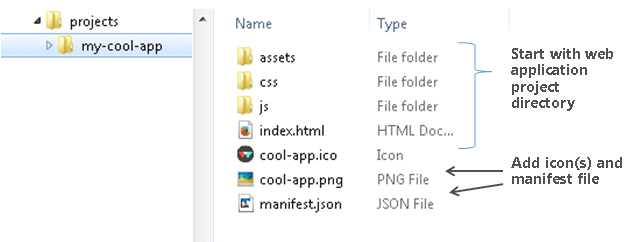
See step 3.2 below for a description of the manifest.
After adding the icon(s) and manifest, You can proceed to build your application.
Create a sample project using crosswalk-app
The crosswalk-app tool can create a starting template for your application:
> crosswalk-app create <package id>package-id is the 3-part Internet-domain name for your package, such as com.abc.myappname. For details on the format, see the Android package documentation.
The command above will create a project with the following structure:
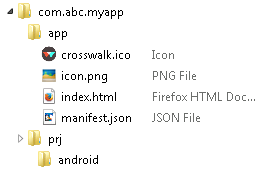
Once created, you can proceed to build your application.
Manually create a very simple web project
For the purposes of this tutorial, we use the simplest possible Crosswalk application: one HTML file.
First, create a directory called
xwalk-simplefor the project:> mkdir xwalk-simple/ > cd xwalk-simple/Next, copy an icon file to that directory, to serve as the application icon. You can use this image:

To use this example, right click on the image and select Save Image As... (or its equivalent in your browser). Save it into the
xwalk-simpledirectory asicon.png. (Note that this image is from the Crosswalk source code and is BSD licensed.)If you have your own favourite icon, copy that to the
xwalk-simpledirectory instead. It should be 128 pixels square.Create two text files inside
xwalk-simple(create them using any text editor, e.g. Notepad on Windows, gedit on Ubuntu):index.htmlThis is a single HTML file which represents the user interface for the application. For the purposes of this tutorial, we are not using any CSS or JavaScript.
The content should be:
<!DOCTYPE html> <html> <head> <meta name="viewport" content="width=device-width, initial-scale=1.0"> <meta charset="utf-8"> <title>Crosswalk Simple</title> </head> <body> <p>Hello World! Crosswalk is great.</p> </body> </html>-
This contains the application metadata (see above). The minimum manifest.json required to build is:
{
   "name": "Crosswalk Simple",
   "xwalk_app_version": "0.1",
   "start_url": "index.html",
   "xwalk_package_id": "com.xwalk.simple",
   "icons": [
     {
         "src": "icon.png",
         "sizes": "72x72"
     }
   ]
}
See the manifest documentation for more information.
Build the application
Once your application is ready, with an icon and manifest.json file, it is ready to be packaged with Crosswalk.
> crosswalk-pkg <folder with manifest.json>This command downloads and imports Crosswalk and creates a package using the files in the path. By default, it will create debug, embedded, 32-bit APKs for both x86 and ARM architectures (recommended). 64-bit APKs can also be created. For options, see the "Usage" section of the Crosswalk-app-tools page, or view the help:
> crosswalk-pkg helpYou are now ready to run the application on a target.
